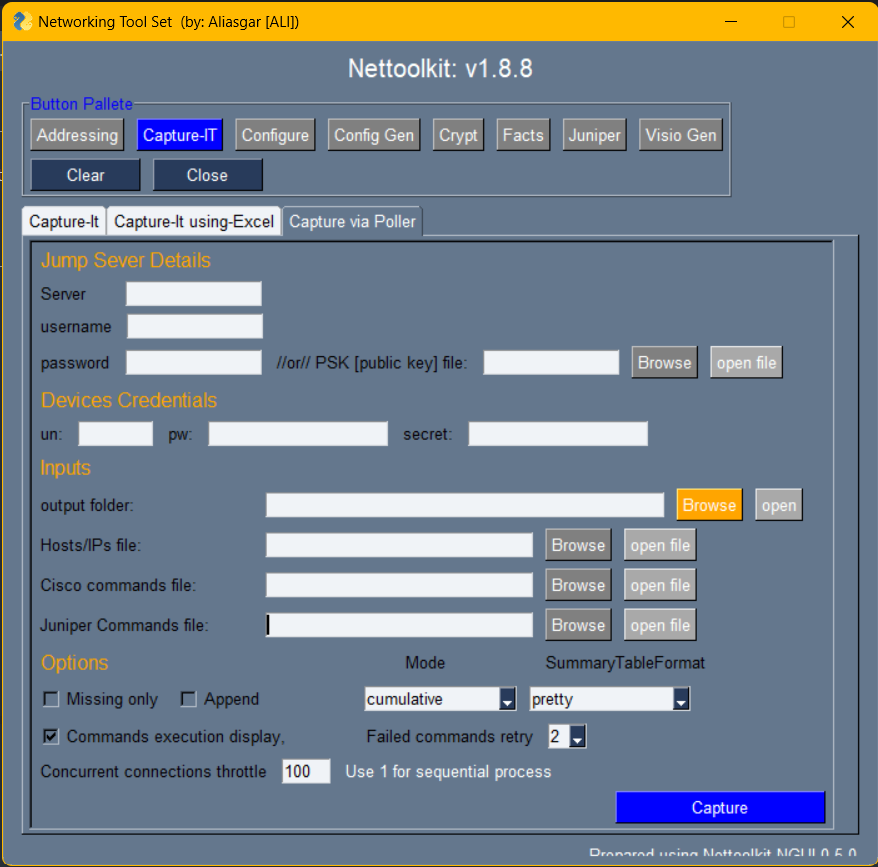
2.1.4. capture-it Tab
A Utility which helps capturing the show commands output from Cisco and Juniper devices efficiently.
Multiple devices can be accessed parallelly to achieve it quickly.
Here are a few Keys to understand.
output folder: Folder where all device show commands output captures will reside.execution log folder: Folder where each individual device execution log will be stored.summary log folder: Folder where summary log (text and excel) of all device execution will be stored.hosts/ip file, cisco commands file, juniper commands file: Provide file reference where those are located. and open it to edit.custom package yaml file: Yaml file containing custom package and class listing. ( more details below )append: use this key if don’t want to loose previous capture, but want to append the new captures to it.capture only missing outputs: use this key if want to re capture only a few missing commands and want to avoid duplicate outputs.run custom dependent commands: Enable it to access custom class to derive custom commands for captures. will be skipped otherwise.excel parsed file: Enable it to parse the capture output and extract information in excel clean files.transpose summary log: Summary log will be transpose format in excel. ( Device v/s Commands )forced login: Enables to try ssh device even if device ping was unsuccessful.output mode: Define output format. ( Either individual files for each commands output, or club all in a single file, or both )concurrent connections: Set it as per your choice and device/network capability.
2.1.5. Demo Video - Capture-IT
A small sample Demo video on YouTube

—
Sample of customer.yaml
capture_it:
   custom_dynamic_cmd_class: !!python/name:custom_captureit.cisco_bgp.CiscoBgp ''

facts_finder:
   CustomDeviceFactsClass: !!python/name:custom_factsgen.CustomDeviceFacts ''
   foreign_keys: !!python/name:custom_factsgen.FOREIGN_KEYS ''
Where, we have a class named CiscoBgp in cisco_bgp module at custom_captureit package. [ referenced as custom_dynamic_cmd_class] And, we have a class named CustomDeviceFacts in a package custom_factsgen. [ referenced as CustomDeviceFactsClass] Similarly, we have a dictionary defined named FOREIGN_KEYS in a package custom_factsgen. [ referenced as foreign_keys]
custom_dynamic_cmd_class: A class that work on existing command capture, and possess a property cmds, which will in turn returns other additional commands for which output to be taken
CustomDeviceFactsClass: A class which takes cleaned facts dictionary as argument and work on it, to derive the additional custom attributes, required to be added to clean output file. foreign_keys: A Dictionary with list of additional fields required to be added to clean excel file. ( custom fields mentioned here, only those will be permitted to be add in clean files.)
Sample Foreign key dictionary:
FOREIGN_KEYS = {
   'bgp':[ "router_id", ],
   'vrf':["vrf_vpnid", "vrfcolor", ],
   'interfaces':[ "int_type",  "int_type", "int_description", ],
}
Instead of capturing same commands for each device, devices can be group together in excel and outputs can be captured for those accordingly..

Note
For Capture via Excel follow below points,
Tabs should be separated for group of devices ( example : access layer, core layer etc..)
- each tab should have below columns.
ips: list of all respective tab device ips follows it.
cisco_ios: list of all cisco ios commands follows it.
juniper_junos: list of all juniper (junos) commands follows it.
arista_eos: list of all arista switch commands follows it. (leave blank if none.)
IP’s present in multiple tabs: outputs will be appened for all tabs where it present.
Capture via a jump host server is possible via below tab.