2. Installation & Requirements
2.1. Requirements
python >= 3.9 ( Tested with python 3.10 )
MS-Excel ( Tested with Office 365 )
MS-Visio ( Tested on MS Visio2013 )
Visio stencil(s) ( Free available on web )
Jinja Templates ( Create your own - samples given )
2.2. Installations
Install the nettoolkit package using pip:
pip install --upgrade nettoolkit
There are many other ways to install packages such as conda install or manual wheel file download and install. You can do it as per your prefered choice of installation.
Just in case if you are running windows OS and pip is not in your path, than above may throw error. You can intall it with python -m in such case
Example:
python -m pip install --upgrade nettoolkit
Install windows os library for python:
pip install --upgrade pywin32
    # or
python -m pip install --upgrade pywin32
This is mandatory for MS-visio drawing generation. And it will work only on windows platforms.
2.3. Inherited python packages
Below are a few inherited packages by Nettoolkit. By default those will also get auto install along with Nettoolkit except pywin32. However just in case if any of these are missing and could not installed, please try to manually install those with pip install command as mentioned above.
pandas ( Tested on - 2.3.1 )
openpyxl
numpy ( Tested on - 2.2.6 )
xlrd
pyyaml
attrs
jinja2
paramiko
netmiko
ntc-templates
jumpssh
tabulate
colorama
pyfiglet
pywin32 ( manual install required - this is to interact with MS office apps )
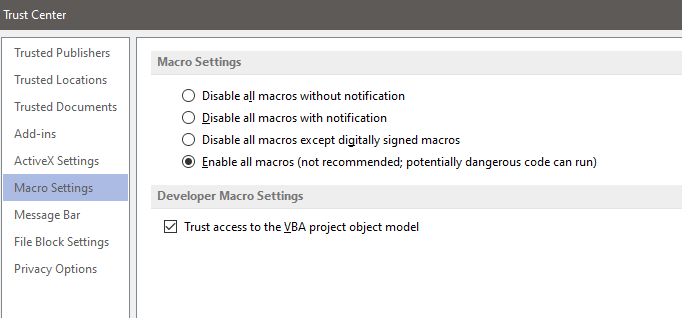
2.3.1. Do this: Enable Macros for MS-Visio
Enable all macros from Trust Center settings in order to allow visio access for script. ( Optional, Only in case if access error )